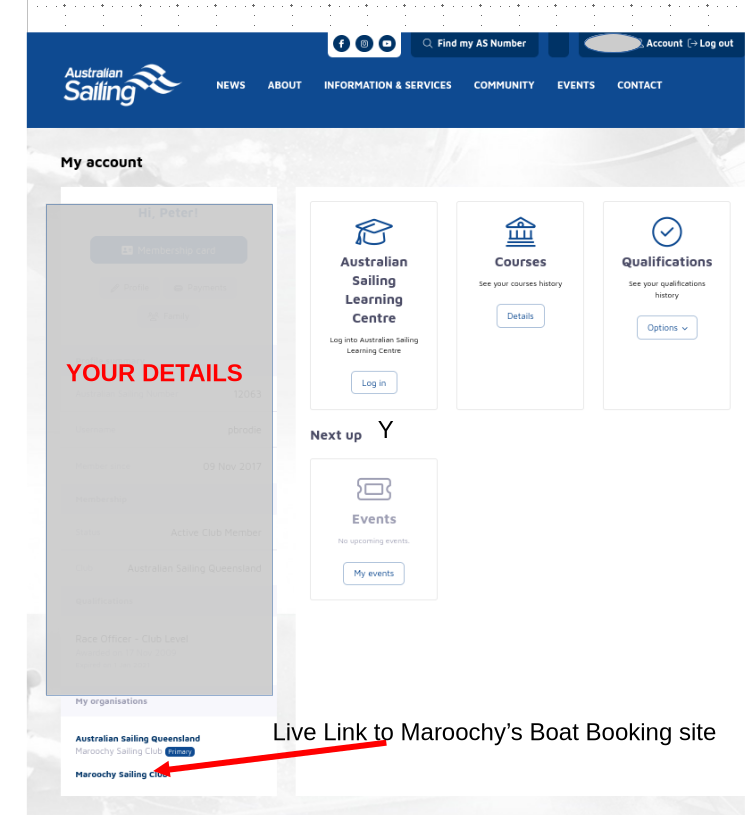
Our Club has a number of Dinghies available to hire to Members only for participation in Club Events and Training Activities.
Online Booking and Payment is available and required.
ON-LINE BOOKING AND PAYMENT PROCEDURES
STEP 1 Log In to your Australian Sailing / Maroochy Sailing Club Account - Username and Password required.
STEP 2 Open Maroochy Sailing Club link at bottom of LHS column text of your My Account page at revsport/Australian Sailing.
STEP 3 A Club Page opens with our Club Logo (Black Swan Badge) in the top Banner. Make a Booking live-link is in the Central Box.
STEP 4 A list of available Boats is presented — explore and choose your boat.
STEP 5 Complete Dates and Booking Times.
STEP 6 Complete payment using the revSports online system.
If successful, you should have an Invoice and receipt !